What Are QC Finds? Complete Guide 2026
Learn everything about QC finds — what they are, how QC photos work, where to find reliable QC references and how to use them to make better purchasing decisions through shopping agents.
QC finds are inspection-photo references for a shopping-agent order. Useful QC photos connect a received item to its exact listing, selected option, order stage and capture date. Seller listing photos show a product offered for sale; they do not show what arrived for your order.
This guide explains how to trace a photo to its source, compare visible details and record what is still unknown. Start with the three attributed examples below or use the checklist with photos you already have.
Three product-photo reference cases
These photographs were supplied through the operator-owned ZJhao channel and authorized by the operator for FindHaul use. They are not AI illustrations. The operator describes the collection as a mix of sample-display and inspection photographs, taken approximately in late 2025; that date is an operator statement, not independently verified photo metadata.
The individual photographer, exact capture date, warehouse, order and selected variant have not been established for each image. We therefore label them product references, not verified warehouse QC or FindHaul hands-on tests. Source-post item IDs link the references to listings, not to an authenticated brand or a particular inspected order.
Photo review: September 12, 2026 · FindHaul editorial team · Scope: visible image details and source-post item IDs, not current price, stock, authenticity or seller reliability.
Jeans: a ruler background is not a fit measurement
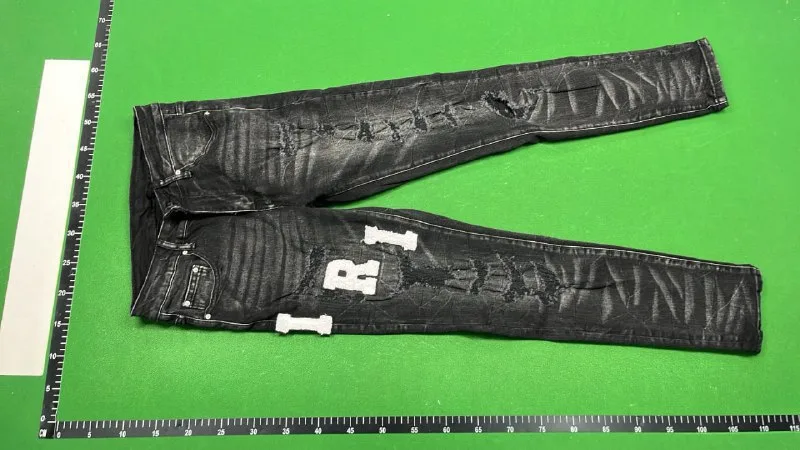
What to check next: This view does not establish waist size, inseam, fabric composition or how the garment fits. Ask for a flat waist measurement and a separate inseam measurement of the selected size.
Read the full observation and its limitsShoes: side views do not establish the selected size
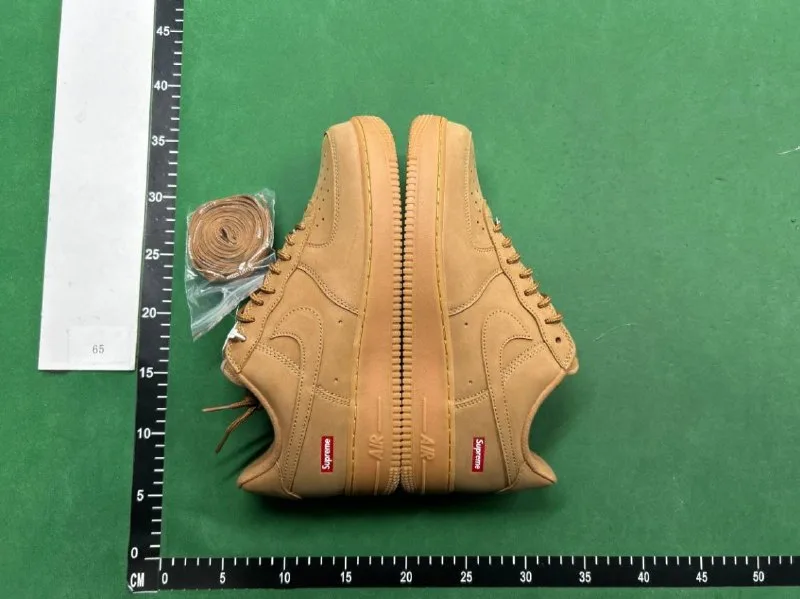
What to check next: A surrounding ruler does not measure usable internal length. The size labels, insoles and outsole bottoms are not shown here. Request those views for the exact option before assessing size or matching the pair.
Read the full observation and its limitsCrewneck: compare the photo with the listing option
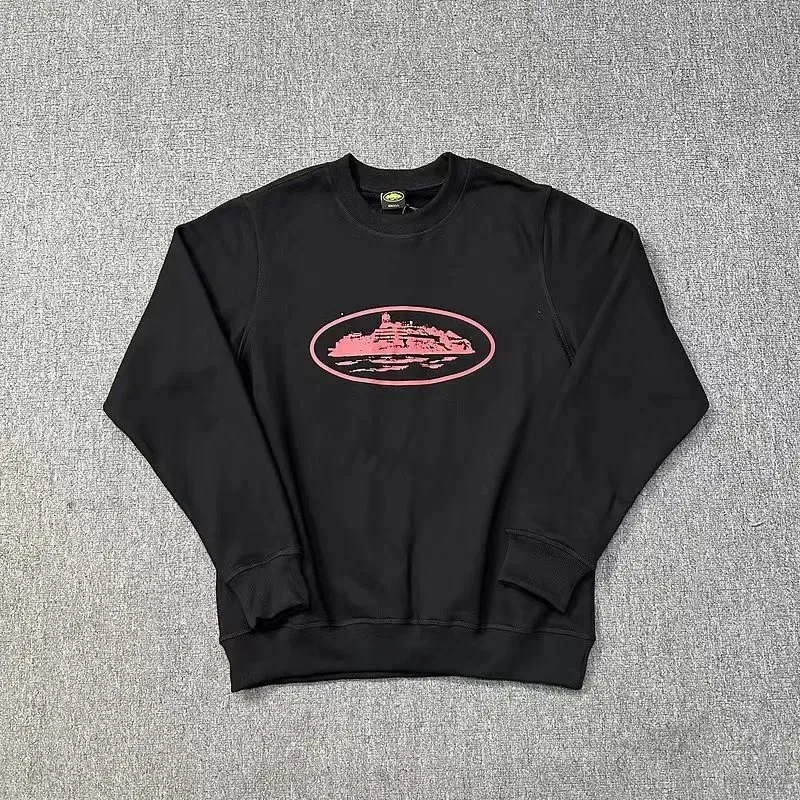
What to check next: Confirm the seller option code and garment type rather than assuming every image in a multi-style post represents the same item. The label discrepancy alone does not prove a seller error or product defect.
Read the full observation and its limitsWhat Exactly Are QC Finds?
QC finds commonly refers to inspection-photo references. Before treating a photo as evidence of your received item, match its original inspection record to your order and selected option. Seller photos, community uploads and the three reference cases above do not establish that connection by themselves.
Before ordering, use a source listing to identify the item and option; inspection photos for your order may not exist yet. After warehouse arrival, check the provider's order record for available photos and request any missing views you need. Photo coverage and extra services vary by provider and order.
If the photos reveal a possible issue, check the selected option and contact the provider before international shipment. Photo services, reporting deadlines and return eligibility depend on the provider, seller and order; a return or exchange is not guaranteed. A photo review is a checkpoint, not proof that every problem will be detected.
Why QC Finds Matter for Shoppers
Without QC photos, international shopping through agents would be considerably riskier. You would be shipping items internationally based only on seller listing photos, trusting that the product matches the description. QC finds bridge this trust gap by providing visual evidence of the actual product condition.
QC images can help a reader compare visible details such as stitching, labels, measurements or packaging. They do not establish authenticity, hidden material quality, long-term durability or the consistency of other orders. Compare only clearly connected images and keep uncertain conclusions marked as unknown.
Where to Find QC References
QC references can come from a buyer's agent dashboard, a spreadsheet, a forum post or another external page. Before comparing an image, check whether its source identifies the exact listing, option, order stage and date. Community comments and quality assessments are unverified context unless their connection to the same item can be established.
FindHaul organizes QC research references across agents and categories — visit the QC finds hub for source-checking guidance by agent and product type. Agent-specific pages include Kakobuy QC research, Superbuy QC research and more.
Try a source-to-photo evidence check
Keep the original listing ID, selected option, photo source, order stage and capture date together. If the source cannot connect an image to a specific order and option, mark those fields UNKNOWN. A listing image can help identify a style; it cannot substitute for a photograph of your received item.
Use the interactive QC evidence checklist to mark each check as checked, unresolved or not applicable, then download those statuses. Keep listing IDs, order details and photo dates in your own private notes; the checklist does not upload photos or verify an order. For the two agent pages with current catalog examples, compare Oopbuy source-item checks and Sugargoo source-item checks. These generated agent links are not verified imports or QC results.
For a seller-listing example, open the embroidered streetwear hoodie reference and compare its recorded item ID, seller image and source-check date. Those listing details can identify a candidate, but they are not warehouse inspection evidence. The 100-product source collection provides more listing references with the same distinction.
Evidence wording and checklist instructions updated October 19, 2026. The evidence workflow was added October 2; the three photographs retain their original September 12 editorial review date. These editorial changes are not a new physical inspection.
QC Finds vs Spreadsheet Finds
Spreadsheet finds organize product or research links; QC references can add visual context for a particular item or order. Neither proves current availability or overall quality. A careful workflow traces the spreadsheet row to the live listing and then checks whether a QC reference is connected to the same item and option.
On FindHaul, the spreadsheet reference library, API-backed source catalog and QC evidence hub serve different tasks. The hub includes three attributed product-photo cases with explicit evidence limits, not a verified warehouse-QC database. A catalog record does not imply that QC photographs are available for that item.
Key Takeaways About QC Finds
- Confirm the source and order connection before treating a QC-labelled image as warehouse evidence.
- They provide a critical checkpoint between purchase and international shipping.
- Externally shared QC images require source, item and date checks before comparison.
- QC references and spreadsheet rows are research inputs, not independent verification.
- QC photos are references, not guarantees — quality can vary between batches.
FAQ
What does QC stand for?
QC stands for Quality Control. In the context of shopping agents, QC refers to inspection photos taken at the agent's warehouse before items are shipped to the buyer.
Are QC finds the same as product listings?
No. Seller listing photos describe an offer. A warehouse inspection photo is evidence for a received item only when its source connects it to that order and option. A shared image labelled QC may not establish that connection.
Can QC photos guarantee product quality?
No. Order-linked photos can help assess visible details of that item. They do not establish authenticity, hidden defects, durability or the condition of another order. Unlinked images remain references, not proof of what you received.